I will describe the case for continuous variables, i.e. dimensions, times, masses, etc. Another important note: I will only talk about the case of characteristics that can be measured repeatedly without fear that this characteristic changes from measurement to measurement. The opposite case (not being the subject of this article) are tests, where the measurement means either the destruction of the measured element or the irreversible change of characteristics, e.g.:
Another important note: preparing an element for measurement may damage it, while the measurement can be performed many times without affecting the measured characteristics, e.g. measuring the length of a weld requires making a cross-section, but a sample can be measured many times.
Let us imagine, for example, that we have a problem with a varnish coat, the thickness of which should be in the range of 0.3-0.4 mm. The varnish layer is created in a process that uses the phenomenon of electrophoresis, in which water-thinnable paint covers the painted object, which is connected to a suitable electrode.
Before you start improving the process, check how well you can measure the thickness of this coating. First you have to prove that you measure correctly and only then you can correct the painting process if you really need to. A minimum of 10 parts (there may be more) should be selected, however the parts should be not collected one after another. Part selection should probably take several days as parts must cover the full range of tolerance and in addition approximately 20% of parts should be outside the upper and lower specification limits.
Sample data below. It can be seen that there were 3 operators, 10 parts and 3 repetitions. The table contains structured data, but of course the parts were measured in a randomized manner.
Tab. 1 MSA data for self-analysis.
| Part | Operator | Thickness |
|---|---|---|
| 1 | A | 0,3257 |
| 1 | A | 0,3404 |
| 1 | A | 0,3213 |
| 2 | A | 0,4150 |
| 2 | A | 0,4017 |
| 2 | A | 0,3932 |
| 3 | A | 0,3278 |
| 3 | A | 0,3259 |
| 3 | A | 0,3362 |
| 4 | A | 0,2909 |
| 4 | A | 0,2868 |
| 4 | A | 0,3077 |
| 5 | A | 0,3424 |
| 5 | A | 0,3501 |
| 5 | A | 0,3669 |
| 6 | A | 0,2917 |
| 6 | A | 0,3025 |
| 6 | A | 0,2907 |
| 7 | A | 0,3894 |
| 7 | A | 0,3956 |
| 7 | A | 0,3998 |
| 8 | A | 0,3110 |
| 8 | A | 0,3152 |
| 8 | A | 0,3187 |
| 9 | A | 0,3922 |
| 9 | A | 0,4057 |
| 9 | A | 0,3919 |
| 10 | A | 0,3885 |
| 10 | A | 0,3748 |
| 10 | A | 0,3833 |
| 1 | B | 0,3515 |
| 1 | B | 0,3660 |
| 1 | B | 0,3339 |
| 2 | B | 0,4370 |
| 2 | B | 0,4092 |
| 2 | B | 0,4038 |
| 3 | B | 0,3477 |
| 3 | B | 0,3563 |
| 3 | B | 0,3423 |
| 4 | B | 0,3139 |
| 4 | B | 0,3053 |
| 4 | B | 0,3260 |
| 5 | B | 0,3603 |
| 5 | B | 0,3647 |
| 5 | B | 0,3467 |
| 6 | B | 0,3308 |
| 6 | B | 0,3107 |
| 6 | B | 0,3133 |
| 7 | B | 0,4248 |
| 7 | B | 0,3940 |
| 7 | B | 0,3972 |
| 8 | B | 0,3353 |
| 8 | B | 0,3219 |
| 8 | B | 0,3213 |
| 9 | B | 0,3935 |
| 9 | B | 0,4380 |
| 9 | B | 0,4112 |
| 10 | B | 0,3834 |
| 10 | B | 0,3732 |
| 10 | B | 0,3603 |
| 1 | C | 0,3592 |
| 1 | C | 0,3321 |
| 1 | C | 0,3239 |
| 2 | C | 0,4236 |
| 2 | C | 0,4062 |
| 2 | C | 0,4402 |
| 3 | C | 0,3393 |
| 3 | C | 0,3314 |
| 3 | C | 0,3581 |
| 4 | C | 0,2974 |
| 4 | C | 0,3377 |
| 4 | C | 0,2872 |
| 5 | C | 0,3831 |
| 5 | C | 0,3747 |
| 5 | C | 0,3891 |
| 6 | C | 0,3552 |
| 6 | C | 0,3097 |
| 6 | C | 0,3578 |
| 7 | C | 0,4073 |
| 7 | C | 0,4012 |
| 7 | C | 0,3850 |
| 8 | C | 0,3652 |
| 8 | C | 0,3699 |
| 8 | C | 0,3496 |
| 9 | C | 0,3991 |
| 9 | C | 0,4305 |
| 9 | C | 0,4509 |
| 10 | C | 0,3624 |
| 10 | C | 0,3809 |
| 10 | C | 0,3995 |
Data analysis will be performed in Minitab 18. You can analyze the data yourself in the program. Just copy the data and follow the steps.
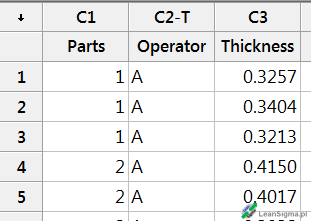
The data should be copied in that way that the header is on the first, unnumbered, gray line (see Fig. 1).
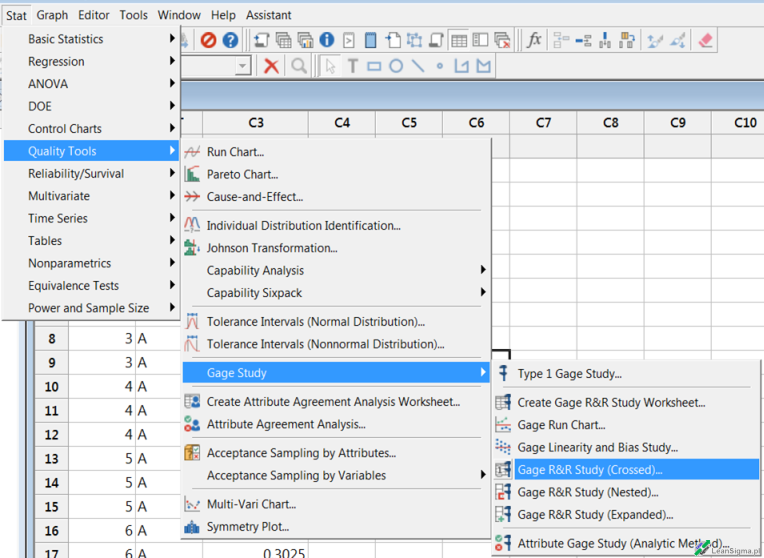
Then select "Gage R&R Study Crossed" from the menu as shown in Fig. 2.
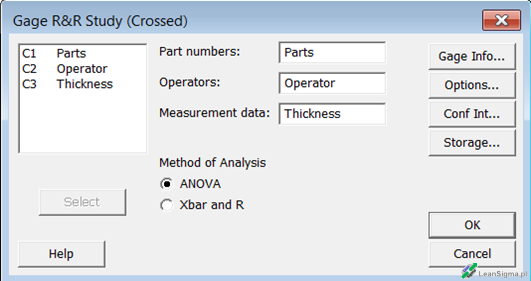
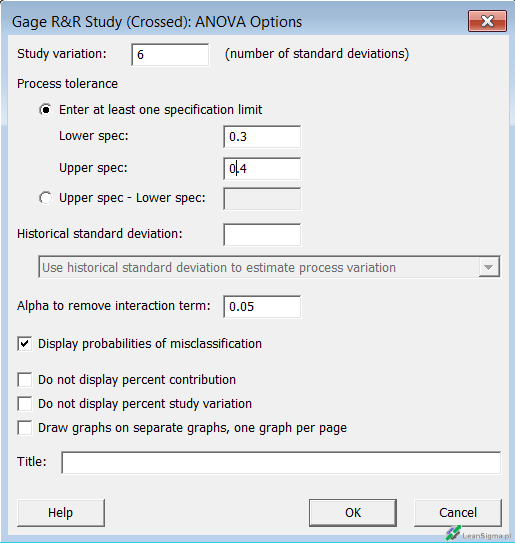
In this box you need to determine which data column indicates Part, Operator and Measure (see Fig. 3) and then select the "Options" button to enter the tolerances for the measured characteristic (part). After pressing the button, another window will appear (see Fig. 4), where you should enter the tolerance range. In this case, 0.3 and 0.4, while the decimal separator depends on the system settings and therefore in the window you can see the numbers 0.3 and 0.4 (this is what I use for my own settings).
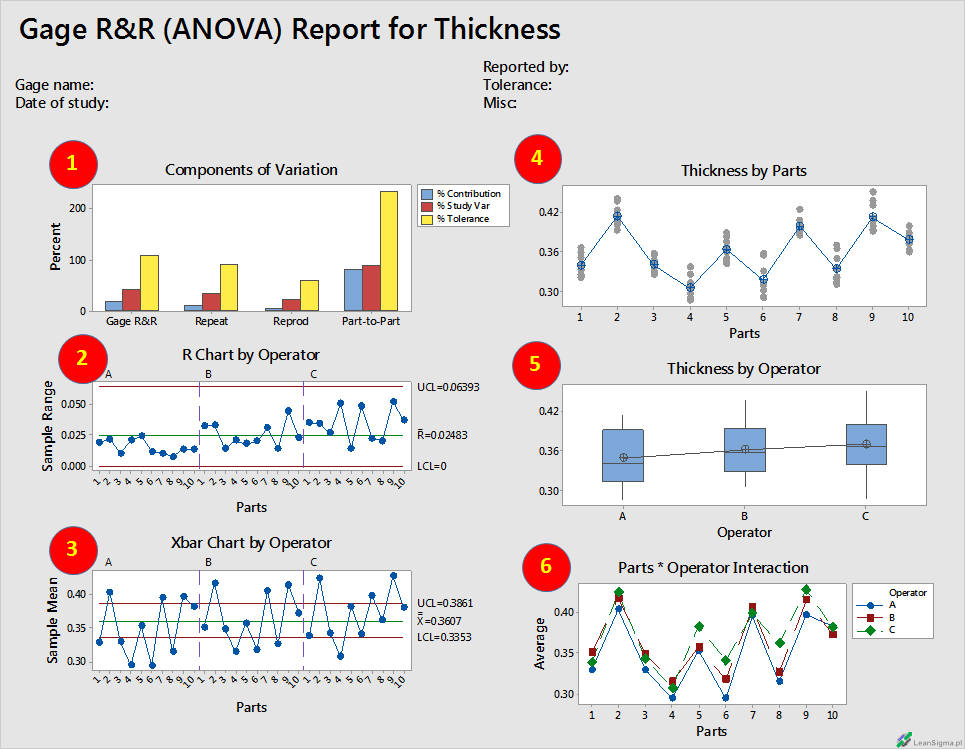
That is all. Minitab will do the rest for us. There is still an interpretation of the results left. I will analyze the individual diagrams numbered from (1) to (6) in Fig. 5:
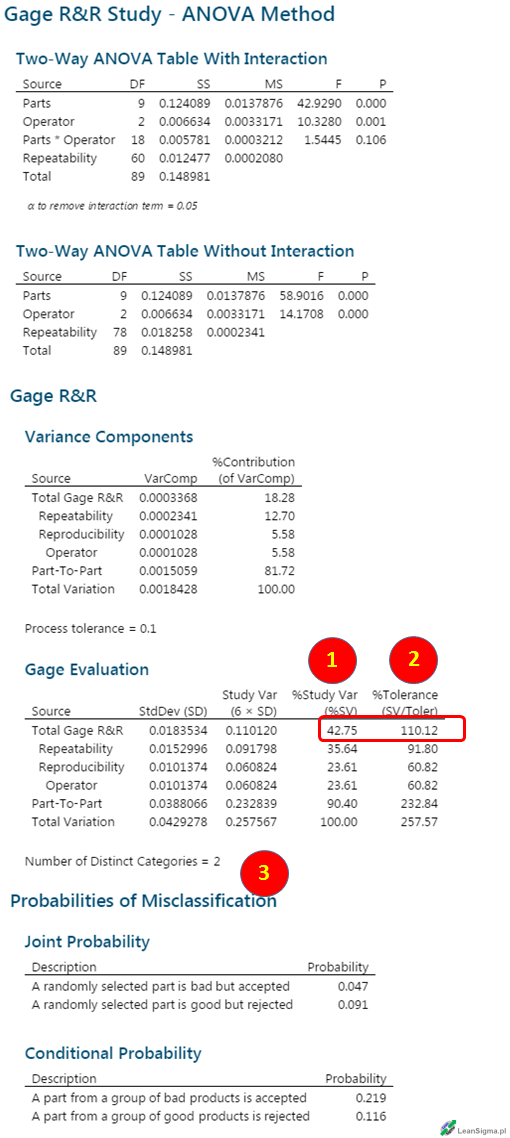
Minitab creates several tables of results. The first 2 sections are the ANOVA table. For you, the most important numbers are marked with (1), (2), (3). Look carefully at the "Gage Evaluation" table at the end. I explain the meaning of the selected points:
I am aware that I have not exhausted the topic of MSA. Nothing can replace training and contact with an experienced person. And even better, if an experienced person could advise you in your case. Feel free to contact me. At this point, we are doing training conducted by people working in the positions of Black Belt or Master Black Belt in manufacturing or service companies. We know the difference between theory and practice and we know how to apply theory to practice.
Author: Adam Cetera (LeanSigma.pl)
Creation date: 2018-09-17
Modification date: 2018-09-17
Leave a comment below if you would like to add something?
